Review Process
This section describes the submittal review process utilizing the Quality Control Checks tab of the Compliance Form.
Review Tiers
AHJs and RAs may select different review scopes based on their enforcement philosophy and resource availability. The review tiers are designed to align quality assurance efforts with AHJ and RA goals, available budgets, and resource constraints. While all tiers emphasize impactful elements, Tiers 3 and 4 provide a greater level of targeted scrutiny, focusing on many of the key compliance drivers. Only Tier 5 is intended to offer a fully comprehensive evaluation. As such, while earlier tiers can identify critical issues, some items may go undetected without the full-scope analysis provided by Tier 5.
This document includes five review tiers, ranging from Tier 1 (least rigorous) to Tier 5 (most rigorous).
- Tier 5 provides the most comprehensive assessment, covering all applicable review checks.
- Lower tiers offer reduced review scopes, often chosen due to technical or time constraints.
- Estimated review times apply to the first review only (not subsequent iterations) and can vary significantly based on reviewer experience, project complexity, and the quality of submitted materials. These estimates serve as planning guidelines rather than fixed guarantees.
Tier 1 – High-Level Review (~1–2 hours)
A high-level completeness check that focuses on automated flags in the Quality Control Checks tab within the Compliance Form.
Tier 2 – Limited Targeted Review (~3–7 hours)
Includes Tier 1 checks, plus a sample of review checks focused on higher impact building features.
- If ≥20% of checks fail, consider a Tier 4 review for a deeper assessment.
Tier 3 – Moderate Targeted Review (~8–15 hours)
Includes Tier 1 checks, with an expanded review of higher impact building features compared to Tier 2.
- If ≥20% of checks fail, a Tier 4 review is recommended.
Tier 4 – Comprehensive Targeted Review (~16–21 hours)
Includes Tier 1 checks, plus all checks that target specific systems and components affecting major end uses.
Tier 5 – Full Review (21+ hours)
A complete analysis, covering all applicable review checks to ensure thorough compliance.
Review Steps
Refer to Figure 3 below for a flow chart depiction of the review steps.

- Use the Submittal Checklist tab of the Compliance Form to verify that all required materials are provided.
- Review the Dashboard tab of the Compliance Form to verify the compliance outcome and confirm that the modeler and design professional have signed the submittal.
- Review the General Information tab of the Compliance Form to understand building type, size, location, whether it’s a new construction or renovation and the compliance path followed.
- Review the Energy Performance Summary tab of the Compliance Form to understand which end uses have significant impact on the modeled energy use.
- Use Quality Control Checks tab of the Compliance Form to select the desired review tier.
- Review the Quality Control Checks tab of the Compliance Form to evaluate the status of the automated checks, and to determine which checks are relevant to the selected review tier.
- Informative notes and comments with required corrective actions can be provided in the Quality Control Checks tab of the Compliance Form.
- The Submittal Review Manual recommends that if more than 20% of checks fail, then a more rigorous review tier should be used for subsequent reviews. Reviewers may choose a different threshold if desired. If fewer checks fail, revisions may still be requested from the submitter.
Step 1: Check Submittal for Completeness
Applicability: All review tiers
- Use the Submittal + Mand. Req. Checklists tab of the Compliance Form to verify that all required materials are provided. Request additional information if submittal is incomplete.
- Review the Dashboard tab of the Compliance Form to verify compliance outcome and confirm that the modeler and design professional signed off on the submittal as required.
Step 2: Get a general understanding of the project
Applicability: All review tiers with tier-specific guidance noted below in parentheses
- Review the General Information tab of the Compliance Form to understand building type, size, location, whether it’s a new construction or renovation, and the compliance path followed. (All tiers)
- Review the Energy Performance Summary tab of the Compliance Form to understand which end uses have a significant impact on the modeled energy use. (See Identifying Impactful Aspects of the Submittal section) (All tiers except tier 1)
Step 3: Establish review scope
Applicability: All review tiers
- Open the Quality Control Checks tab of the Compliance Form (Figure 4). and begin by selecting which review tier will be used.
- The tab contains all review checks outlined in the manual. The Compliance Form utilizes automated logic to select a sample of checks based on the chosen review tier, automatically setting the "Include in Review" column to "Yes" for the selected checks. This process follows the guidelines described in the Identifying Impactful Aspects of the Submittal section and Establishing Review Scope section of the Manual. The number of checks included will vary based on the selected review tier.
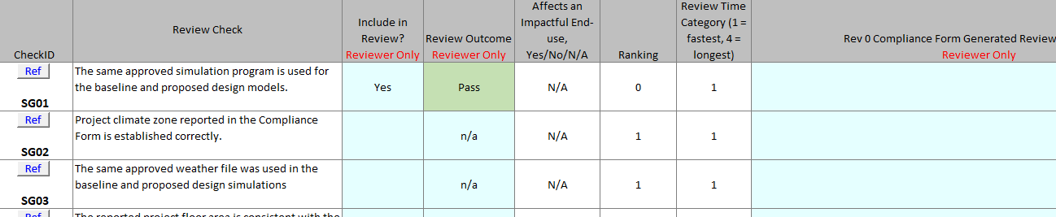
- For some of the pre-selected checks, the review outcome is automatically set to “Pass” or “Fail” based on the information provided on other tabs of the Compliance Form. For checks with a “Fail” outcome, a default review comment is displayed and may be edited by the reviewer.
Step 4: Perform the review
Applicability: All review tiers
-
Perform the selected review checks in the order listed in the QC Checks tab of the Compliance Form.
Record “Pass” or “Fail” outcome for each check and provide actionable review comments for each check
with the “Fail” outcome.
- A “Pass” outcome means that no changes are required in the given area and any provided comments can be treated as informative.
- A “Fail” outcome means that changes must be made to the submittal before it is approved. In this case, the issues and required changes should be described in the review comment.
- Confirm the outcome on the checks that are automatically set to “Pass” and update the outcome if necessary.
- Use the CheckID provided in the QC Checks tab to locate the 90.1 references and tips for performing the check in the Review Checks section of the Manual as necessary.
- For checks that involve verifying simulation reports, use the names of the reports listed for each check to locate the annotated reports in the Simulation Reports section of the Manual.
Step 5: Communicate the review outcome to the permit applicant
Applicability: All review tiers
Provide written comments to the applicant if corrective actions are required or approve the submittal. The comments may be communicated by returning the Compliance Form with the filled-out Quality Control Checks tab to the applicant.