Lighting, Interior (LI)
Overview
Lighting Interior check group addresses interior lighting power and controls. Table 7 summarizes the checks included in this group.
Table 7: Lighting Interior Quality Control Checks Overview
| Focus of the Check | Type of Check | Proposed Design | Baseline/Budget Design |
|---|---|---|---|
| General | CF inputs reflect design documents | LI01 | NA |
| Simulation outputs consistent with CF | LI11 | NA | |
| Lighting Power | CF inputs reflect design documents | LI02-P | NA |
| CF inputs reflect requirements of ECB/PRM | LI03 | LI03 | |
| Meet mandatory requirements | NA | NA | |
| Simulation inputs consistent with CF | LI07 | LI07 | |
| Simulation outputs consistent with CF | LI06 | LI06 | |
| Lighting Controls | CF inputs reflect design documents | LI04-P | NA |
| Meet mandatory requirements | LI05 | NA | |
| Simulation inputs consistent with CF | LI08 LI09 | LI08 LI09 | |
| Simulation outputs consistent with CF | LI10 | LI10 | |
| Legend: PASS/FAIL/NA outcome is determined automatically in the Quality Control Checks tab of the Compliance Form. | |||
The following strategies should be used to prioritize the review:
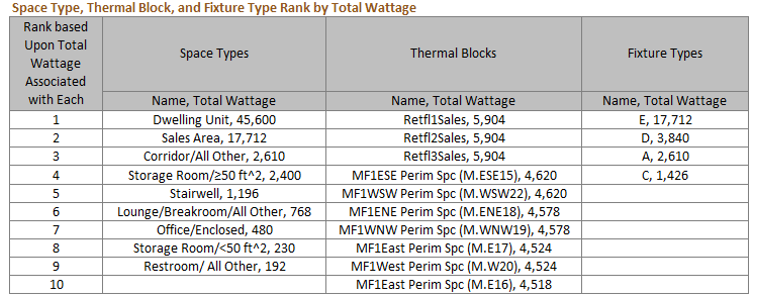
- For checks that verify the specified fixture wattages, focus on fixtures that account for the largest total wattage on the project and spot-check the rest.
- For checks that verify the specified fixture counts, focus on space types that account for the largest total wattage and spot-check the rest.
- For checks that verify that the lighting wattage is modeled as reported, check the thermal blocks that account for the highest wattage.
- 90.1 Section 9 requires occupancy sensors and daylighting controls in many types of spaces. These requirements are mandatory and must be met where applicable. Perform the checks to verify that mandatory requirements are met for a representative sample of spaces selected as described in #2 above.
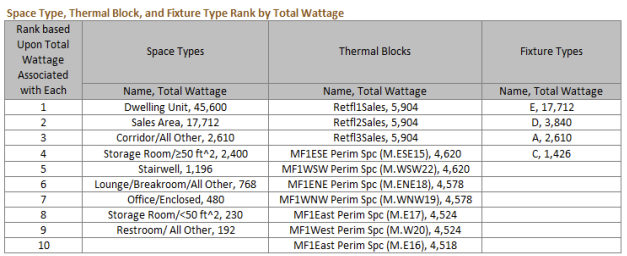
Refer to the table included in the Quality Control Checks, Lighting Interior section that ranks lighting fixtures, space types and thermal blocks based on their total wattage to facilitate the prioritization described above.
For 90.1 2022 PRM alterations subject to G3.3 (i.e., Minor Alterations), the summary tables on the Quality Control Checks tab in the Compliance Form may not reflect correct values for the baseline since projects, for the most part, only enter proposed design information and provide notes as to what was modeled in the baseline in the notes fields associated with the proposed design related tables. Refer to the 90.1 2022 Section G3.3 Performance Calculations for Other Alterations section for more information regarding 90.1 2022 G3.3.
LI01 The floor area used in the lighting calculations is consistent with the reported project floor area.
Review Tips
- In order to establish the baseline/budget lighting power allowance, the floor area of individual spaces (for projects using space-by-space method) or building area types (for Energy Cost Budget Method projects using building area method) are reported in Table 1 of the Interior Lighting Counts tab. The baseline/budget lighting power allowance will not be determined correctly if the total floor area reported on the Interior Lighting Counts tab does not match the actual floor area in Table 1 of the General Information tab. Misalignment should be flagged. This check is performed automatically in the Quality Control Checks tab with discrepancies over 3% flagged. See also SG05.
LI02-P Proposed lighting power reported in the Compliance Form reflects design documents for spaces where lighting is fully specified
90.1 2016 and 2019/2022 ECB; 90.1 2016, 2019, and 2022 PRM
90.1 Table 11.5.1 #6/90.1 Table 12.5.1 #6; Table G3.1 #6- Where a complete lighting system exists (e.g., in a renovation project where lighting is left as is), the actual lighting power must be modeled for each thermal block.
- Where a lighting system has been designed, lighting power must be determined in accordance with 90.1 Sections 9.1.3 and 9.1.4. Based on these sections, the wattage must include all power used by the fixtures including lamps, ballasts, transformers and control devices and be based on the manufacturers’ labeled maximum wattage of the luminaire. Some exceptions may apply (90.1 Sections 9.1.1, 9.1.3, 9.1.4, 9.2.2.3, 9.4.2).
Review Tips
-
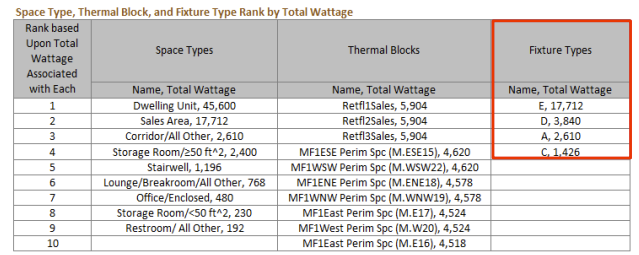
Refer to the table in the Interior Lighting section on the Quality Control Tab to identify
lighting fixtures with the highest total wattage. Focus the review on these fixtures and
spot-check others. data.
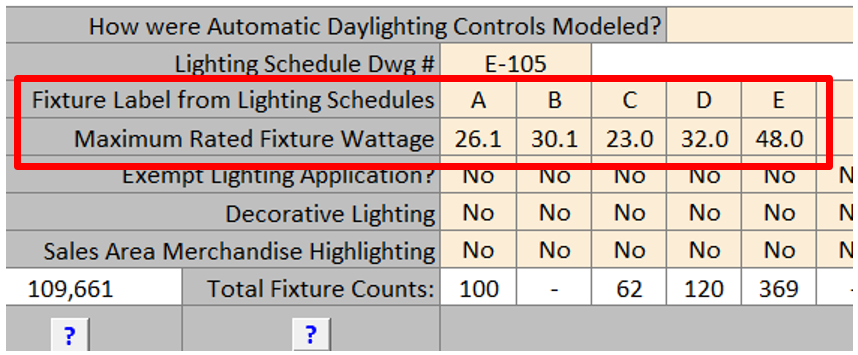
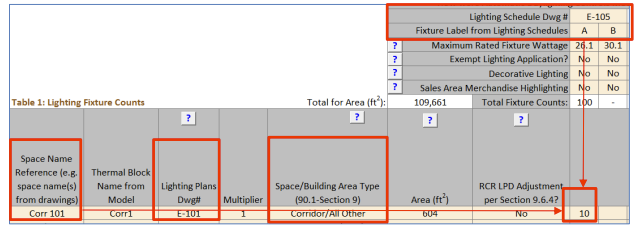
For these selected fixtures, locate fixture make and model on the lighting schedule drawings and verify that the manufacturer maximum rated wattage reported for the fixtures in Table of the Interior Lighting Counts tab is aligned with the manufacturer’s maximum rated fixture wattage shown on the cutsheets. Request cutsheets for selected fixtures if necessary.
Example: Wall sconces installed in the corridors of a multifamily building are specified with two 18W CFL bulbs but have the manufacturers’ rated wattage of 120 W based on incandescent bulbs. The 120W per fixture must be used in the LPD calculations for the proposed design, unless the installed fixtures are re-labeled by the manufacturer based on the CFL lamps. Thus, unless all of the specified fixtures reflect the maximum rated wattage, or the fixtures are re-labeled by the manufacturer, the total fixture wattages specified on the lighting drawings will typically be lower than the wattages that must be used in the lighting compliance calculations.
-
Refer to the table in the Interior Lighting section on the Quality Control Tab to identify space
types that account for the greatest total lighting wattage.
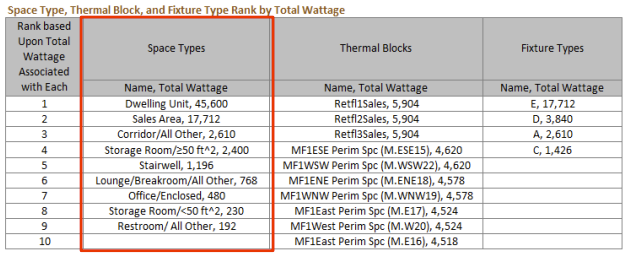
Locate several spaces of that type on the Interior Lighting Counts tab. Refer to the lighting plans to confirm that fixture types and counts for these spaces reported in the Compliance Form match design documents.
- Common Mistakes
- Fixture wattage is not based on a complete fixture including lamp and ballast and does not reflect manufacturer rated fixture wattage.
- Track lighting is not calculated according to the allowed methods as described in 90.1 Section 9.1.4.
- Proposed LPDs are based on partially specified or temporary lighting. For example, in hotel guest rooms the hardwired fixtures shown on drawings are typically supplemented by plug-in floor and table lamps. See LI03-P for the relevant rules.
LI03-P Proposed LPD to be modeled for spaces where lighting is not specified or partially specified is established correctly in the Compliance Form
90.1 2016 and 2019/2022 ECB
Table 11.5.1 #6, Column A, #c/Table 21.5.1 #6, Column A, #c: Where no lighting exists or is specified, lighting power must be determined in accordance with the Building Area Method for the appropriate building type, based on the allowances in 90.1 Section 9.
90.1 2016 and 2019 PRM
Table G3.1 #6, proposed Column, #c:Where lighting neither exists nor is submitted with the design documents, lighting power must be modeled as minimally complying with the prescriptive requirements of 90.1 Section 9, Building Area Method.
90.1 2022 PRM
Table G3.1 #6, proposed Column, #c: Where lighting neither exists nor is submitted with design documents, lighting shall comply with but not exceed the requirements of Section 9. Where space types are known, lighting power shall be determined in accordance with the Space-by-Space Method. Where space types are not known, lighting power shall be determined in accordance with the Building Area Method.
Review Tips
- This check should be performed for projects involving hotels, models, dormitories and multifamily occupancy types, or if the Table 1 on the Lighting Space Types indicate a design status as “Core and Shell”, or if lighting is listed on the General Information tab, “Alterations and Yet to be Designed Systems and Components” section. This logic is used to select this check on the Quality Control Checks tab.
-
The Interior Lighting Counts tab Table 1 includes a column for entering floor area for which
lighting is not specified in the proposed design. This may include spaces where lighting is not
specified (e.g., in core and shell projects) or where lighting is partially specified. Partially
specified lighting is common in residential occupancies. For example, in hotel guestrooms,
hard-wired fixtures may be specified in bathrooms and hallways, to be supplemented by plug-in
table or floor lamps. These plug-in fixtures are often not shown on the lighting drawings, or
the lighting plans may refer to the power and furniture plans for supplemental and task
lighting.
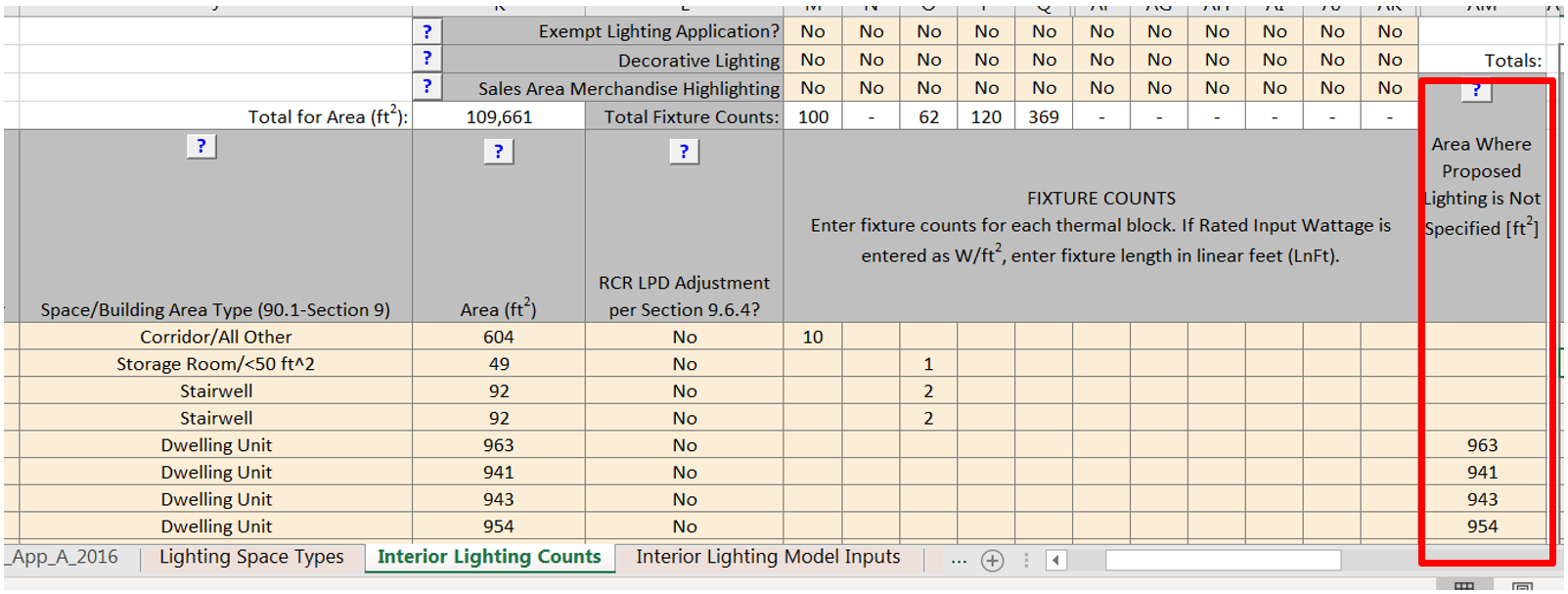
- On projects that include residential occupancies (hotels, motels, dormitories, multifamily) but have no inputs in the “Area where proposed lighting is not specified”, spot-check lighting plans for a sample of residential spaces to confirm that hard-wired lighting is specified in spaces such as guest rooms and is sufficient to meet IESNA-recommended lighting levels. If it is determined that lighting is not fully specified, request that the floor area with no lighting is reported in the Compliance Form as shown above.
LI03-B Baseline/budget Lighting Power Density (LPD) is established correctly in the Compliance Form
90.1 2016 and 2019/2022 ECB
Table 11.5.1 No 6 Column B/Table 12.5.1 No 6 Column BThe budget LPD must be determined using the same categorization procedure (building area or space-by-space method) and categories as the proposed design, with lighting power set equal to the maximum allowed for the corresponding method and category in 90.1 Section 9.2. Lighting in the proposed design that is specifically exempted in 90.1 Section 9.1.1, 9.2.2.3 in 90.1 2016, Table 9.2.3.1 in 90.1 2019, Table 9.2.2.1 in 90.1 2022, 90.1 Section 9.4.2 in 90.1 2016 and 2019, or Table 9.2.2.2 in 90.1 2022 must be modeled in the baseline the same as in the proposed design. Exempt lighting, decorative and retail display lighting allowance can only be claimed if it is specified in addition to general lighting and is separately controlled.
90.1 2016 and 2019 PRM
Table G3.1 #6, Baseline Building Performance columnThe baseline LPD must be established using the space-by-space method based on 90.1 Table G3.7. Lighting in the proposed design that is specifically exempted in 90.1 Section 9.1.1, 9.2.2.3 in 90.1 2016, Table 9.2.3.1 in 90.1 2019, or 90.1 Section 9.4.2 in 90.1 2016 and 2019 must be modeled in the baseline the same as in the proposed design.
90.1 2022 PRM
G3.2 New Construction/Major AlterationsTable G3.1 #6, Baseline Building Performance column
Interior lighting power in the baseline building design shall be determined using the values in Tables G3.7-1 and G3.7-2. However, where lighting neither exists nor is submitted with design documents, and the proposed design lighting power is determined in accordance with the Building Area Method, the baseline building design lighting power shall be determined in accordance with Table G3.8. Where retail display lighting is included in the proposed building design in accordance with Section 9.5.2.2(b), the baseline building design retail display lighting additional power shall be equal to the limits established by Section 9.5.2.2(b) or same as proposed, whichever is less. Lighting in the proposed design that is specifically exempted in 90.1 Section 9.1.1, Table 9.2.2.1, or Table 9.2.2.2 must be modeled in the baseline the same as in the proposed design.
G3.3 Minor Alterations
G3.3.2.6 Interior Lighting applies to alterations subject to 90.1 2022 Section G3.3 (i.e., Minor Alterations) and requires interior lighting power density included in the scope of the alteration to be modeled as meeting the minimum requirements of 90.1 Section 9.1.1.3.1 using applicable allowances in 90.1 Section 9.5.2.1. Lighting not included in the scope of the alteration should be modeled identically in the baseline and proposed.
Review Tips
- Baseline/budget interior lighting is found in the following tables of the Compliance Form:
- Refer to 90.1 2022 Section G3.3 Performance Calculations for Other Alterations for review tips for alterations subject to 90.1 2022 Section G3.3 (i.e., Minor alterations).
- Table 1 on the Lighting Space Types tab shows whether the project used space-by-space or building area method. (Only space-by-space method is allowed for PRM projects except in some narrow circumstances for alterations following 90.1 2022 Section G3.3.)
- Space-by-space LPDs are shown in Table 1 of the Interior Lighting Counts tab, Baseline/Budget group of columns. These values are set automatically by the Compliance Form based on user-provided description of the building area types and space types.c. Space-by-space LPDs are shown in Table 1 of the Interior Lighting Counts tab, Baseline/Budget group of columns. These values are set automatically by the Compliance Form based on user-provided description of the building area types and space types.
- Spot-check the baseline/budget LPDs in spaces where proposed LPD is substantially lower than the baseline/budget LPD (based on Table 1 of the Interior Lighting Counts tab). The exaggerated savings may be due to the mistakes described below. LPD difference over 30% on Energy Cost Budget models and over 50% on Performance Rating Method model should be flagged.
- Common Mistakes
- Baseline LPD increased to include decorative lighting allowance
- 90.1 Performance Rating Method (does not apply to 90.1 2022 alterations subject to Section G3.3): the baseline LPD is always based on the values in 90.1 Table G3.7. There are no provisions for any additional allowances except for 90.1 2022 projects where if retail display lighting is included in the proposed building design in accordance with Section 9.5.2.2(b), the baseline building design retail display lighting additional power shall be modeled as equal to the limits established by Section 9.5.2.2(b) or same as proposed, whichever is less.
- 90.1 Energy Cost Budget: the baseline may be increased to include additional wattage up to the decorative lighting allowance specified in 90.1 Section 9.6.2 only if it meets the requirement of that section (e.g., is installed in addition to the general lighting, is automatically controlled separately from the general lighting and turned off during nonbusiness hours).
Example: The proposed design includes decorative wall sconces in the corridors of a multifamily building. The sconces are controlled separately from the general ceiling lighting and have 0.7 W/ft2 LPD calculated as described in 90.1 Section 9.1.3 and 90.1 Section 9.1.4.
Energy Cost Budget: If the project used the space-by-space method, 0.7 W/ft2 can be added to the budget corridor LPD allowance. If the project uses the building area method, lighting in the budget design cannot be increased to include the decorative allowance. The proposed design must be modeled as specified and include both the general and decorative lighting.
Performance Rating Method (example does not apply to 90.1 2022 alterations subject to Section G3.3): the decorative lighting allowance cannot be added to the baseline. The proposed design must be modeled as specified and include both the general and decorative lighting.
- LPD is based on an incorrect space type.
Using the incorrect space type in 90.1 Table G3.7 (Performance Rating Method path) or 90.1 Section 9.6.1 (Energy Cost Budget path) may lead to an exaggerated baseline/budget LPD allowance.
Example: A project includes a large space that houses some mechanical equipment but is mostly used as storage. Establishing the baseline LPD by applying the allowance for the Electrical/Mechanical space type (1.5W/SF based on Table G3.7 with PRM; 0.97 W/SF based on 90.1 Table 9.6.1 with Note 7 for ECB) to the entire space is incorrect. Instead, the baseline/budget allowance must be established by breaking the space into sub-spaces, as described in 90.1 Section 9.6.1 (a), with the storage room lighting allowance (0.63 W/SF ECB, 0.80 W/SF PRM) used for a portion of the space.
- Baseline LPD increased to include decorative lighting allowance
LI04-P Proposed lighting controls reported in the Compliance Form reflect design documents
90.1 2016 ECB
Table 11.5.1 #6 e,f:- The lighting schedules in the proposed design shall reflect the mandatory automatic lighting control requirements in Section 9.4.1 (e.g., programmable controls or occupancy sensors).
- Design documents must include lighting controls required in 90.1 Section 9.4.1, since these requirements are mandatory.
- Automatic lighting controls included in the proposed design but not required by Section 9.4.1 may be modeled directly in the building simulation or be modeled in the building simulation through schedule adjustments determined by a separate analysis approved by the authority having jurisdiction. As an alternative to modeling such lighting controls, the proposed design lighting power may be reduced for each luminaire under control by dividing the rated lighting power of the luminaire per Section 9.6.3 and Table 9.6.3.
90.1 2019/2022 ECB
Table 11.5.1 #6 e,f,g/ Table 12.5.1 #6 e,f,g:- The lighting schedules in the proposed design shall reflect the mandatory automatic lighting control requirements in Section 9.4.1 (e.g., programmable controls or occupancy sensors).
- Design documents must include lighting controls required in 90.1 Section 9.4.1, since these requirements are mandatory.
- The specified daylighting controls must be modeled explicitly in the simulation tool, or through an adjustment determined by a separate approved analysis. Modeling and schedule adjustments shall separately account for primary sidelighted areas, secondary sidelighted areas, and toplighted areas.
-
Automatic lighting controls included in the proposed design but not required by Section
9.4.1 may be modeled using the following methods for each luminaire under control:
- Manual-ON or partial-auto-ON occupancy sensors shall be modeled by reducing the lighting schedule each hour by the occupancy sensor reduction factors in Table G3.7 for the applicable space type multiplied by 1.25.
- Automatic lighting controls listed in Table 9.6.3/9.5.2.3 shall be modeled using the sum of the applicable control factors (CF). Apply control factors (CF) to only the portion of wattage of the fixtures in the space controlled by said lighting control. Divide each hour of the lighting schedule by (1 +ΣCF), where ∑CF indicates the sum of all applicable control factors for that space per Section 9.6.3/9.5.2.3 and Table 9.6.3/9.5.2.3.
90.1 2016, 2019, and 2022 PRM
G3.2 New Construction/Major Alterations90.1 Table G3.1 #6: The specified daylighting controls must be modeled explicitly in the simulation tool, or through an adjustment determined by a separate approved analysis. Other specified automatic lighting controls included in the proposed design must be modeled by reducing the lighting schedule each hour by the Occupancy Sensor Reduction factors in 90.1 Table G3.7, including Notes b and c below the table. Credit for other programmable lighting control in buildings less than 5000 ft2 can be taken by reducing the lighting schedule each hour by 10%.
G3.3 Minor Alterations
For alterations subject to Section G3.3 (i.e., Minor Alterations), credit for lighting controls that exceed the minimum requirements of 90.1 Section 9.1.1.3.1 can be modeled following the method described in 90.1 Table G3.1 #6.
Review Tips
- Refer to 90.1 2022 Section G3.3 Performance Calculations for Other Alterations for review tips
for alterations subject to 90.1 2022 Section G3.3 (i.e., Minor alterations).
- Refer to 90.1 2022 Section G3.3 Performance Calculations for Other Alterations for review tips for alterations subject to 90.1 2022 Section G3.3 (i.e., Minor alterations).
-
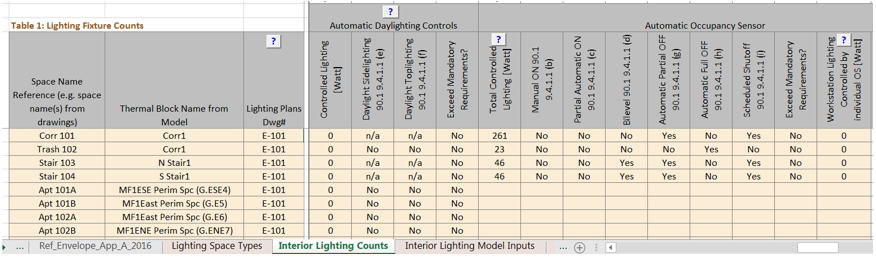
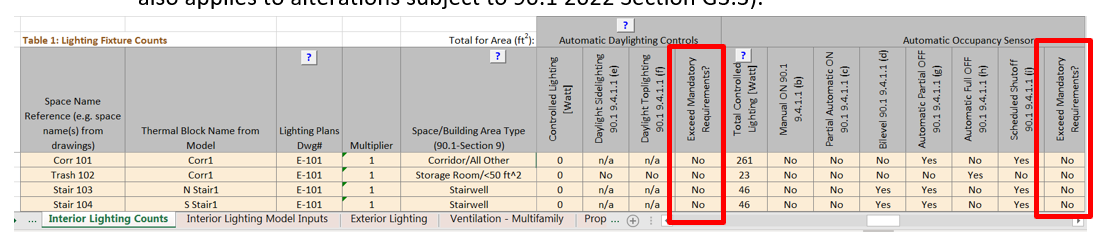
Lighting controls specified for each space are reported in Table 1 of the Interior
Lighting Counts tab. Spot-check large or representative space types (e.g., offices,
corridors and conference rooms in an office building) to confirm that the specified
lighting controls reported for these spaces in the Compliance Form reflect design
documents.
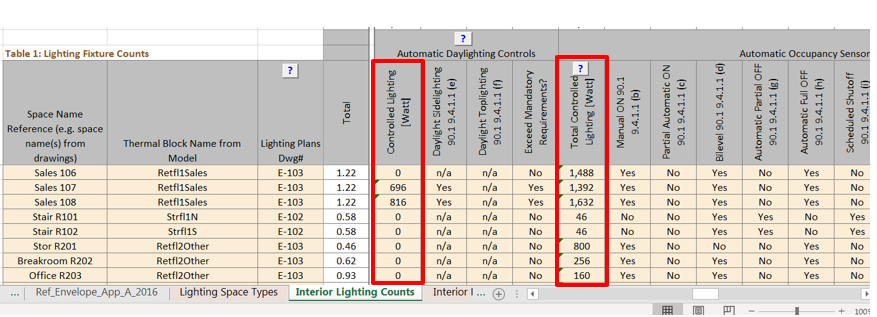
- Credit for daylighting and OS controls must only be applied to the portion of lighting
in each thermal block that is being controlled and not to all lighting in the thermal
block. The controlled wattage withing each space must be listed in the Compliance Form.
Verify that it matches the design documents.
- Tips for Energy Cost Budget projects
- Only the lighting controls in the proposed design that exceed the minimum requirements of 90.1 Section 9.4.1 may be modeled differently in the proposed design compared to the baseline. Examples of controls that exceed the minimum requirements include but are not limited to the occupancy sensors and daylighting controls where they are not required in 90.1 Section 9.4.1, Manual on control where it is not required, automatic full off where only partial off is required, continuous dimming where not required and lumen maintenance controls.
- In 90.1 2016, the standard does not specify the schedule adjustments to be used for capturing occupancy sensor savings, thus the values from 90.1 Table G3.7 Occupancy Sensor Reduction column should be used.
LI05-P Specified lighting controls meet mandatory requirements in 90.1 Section 9
Review Tips
- Refer to 90.1 2022 Section G3.3 Performance Calculations for Other Alterations for review tips for alterations subject to 90.1 2022 Section G3.3 (i.e., Minor alterations).
-
Table 1 of the Interior Lighting Counts tab lists the mandatory lighting control requirements
for each space depending on the space type. The lighting control requirements in 90.1 2016 and
beyond are significantly more comprehensive compared to 90.1 2010 - for example, many spaces
with windows must have daylighting controls. Spot-check lighting controls specified in the
design document for a sample of typical spaces to ensure that they meet the mandatory lighting
requirements shown in the Compliance Form.

- This check is performed automatically in the Compliance Form.
LI05–B Baseline/budget lighting controls are established correctly in the Compliance Form
90.1 2016/2019/2022 ECB
Table 11.5.1 #6 c/ Table 11.5.1 #6 e /Table 12.5.1 #6 e:Mandatory automatic lighting controls required by Section 9.4.1 must be modeled the same as the proposed design.
90.1 2016 and 2019 PRM
Table G3.1 #6: No occupancy or daylighting controls should be modeled, except the lighting schedules for the employee lunch and break rooms, conference/meeting rooms and classrooms (not including shop classrooms, laboratory classrooms and preschool through 12th-grade classrooms) must reflect the reduced runtime hours due to occupancy sensors.
90.1 2022 PRM
G3.2 New Construction/Major AlterationsThe requirements are the same as described in Table G3.1 #6 for the 90.1 2016 and 2019 PRM above.
G3.3 Minor Alterations
Lighting controls shall be modeled as meeting the minimum requirements of 90.1 Section 9.1.1.3.1
in the baseline design model.
Review Tips
- Baseline/budget lighting controls for each space are determined automatically and are shown in Table 1 of the Interior Lighting Counts tab of the Compliance form. This check is automatically completed in the Quality Control Checks tab of the Compliance Form.
- Refer to 90.1 2022 Section G3.3 Performance Calculations for Other Alterations for review tips for alterations subject to 90.1 2022 Section G3.3 (i.e., Minor alterations).
LI06-B, LI06-P Modeled interior lighting peak demand is consistent with the baseline interior lighting wattage reported in the Compliance Form
Review Tips
- Refer to 90.1 2022 Section G3.3 Performance Calculations for Other Alterations for review tips for alterations subject to 90.1 2022 Section G3.3 (i.e., Minor alterations).
-
Table 2 of the Compliance Calculations tab shows non-coincident peak demand for interior
lighting. The value is taken from the simulation reports and reflects the maximum modeled
interior lighting load (kW). Peak lighting demand depends on the modeled lighting wattage, the
hourly lighting schedule, adjustments to the hourly schedule to reflect reduced runtime due to
occupancy sensors (if applicable) and modeled daylighting controls. The modeled interior
lighting peak demand may be compared to the interior lighting wattage reported on the Interior
Lighting Summary tab Table 1 to verify the following for Performance Rating Method (except for
90.1 2022 alterations subject to G3.3) projects:
MLDbase > TLWbase indicates an error in the baseline model because the modeled non-coincident peak demand cannot exceed the maximum wattage reported in the Compliance Form. When this check fails, the model inputs or the baseline lighting wattage reported in the Compliance Form must be corrected.
MLD = modeled noncoincident lighting peak demand from simulation reports[kW]
TLW = total lighting wattage from Table 1 of the Interior Lighting Summary tab [kW]
Optionally, a similar check may be completed for Performance Rating Method proposed design and Energy Cost Budget budget and proposed design. However, for these models the coincident peak demand is expected to be lower than the total lighting wattage reported in the compliance form due to occupancy sensor and daylighting controls. A multiplier of 0.7 may be used to roughly approximate the impact of such controls on coincident demand, as follows:
MLD prop < 0.7*TLW prop
MLD budget >0.7* TLW budget
As part of this check, it is also helpful to verify that the non-coincident lighting peak demand reported in the Compliance Calculations tab Table 2 matches simulation reports.
LI07-B, LI07-P Baseline/budget and proposed wattage entered into simulation tool reflects values reported in the Compliance Form.
Review Tips
Proposed and baseline (budget) LPDs and floor areas may be correctly reported in the submittal, but not match the modeling inputs. For example, there may be a difference in the areas of different space types reported in the submittal compared to what was modeled due to incorrect assignment of the space types to the modeled thermal blocks. Depending on the reporting capabilities of the simulation tool, the following steps should be followed to verify the inputs.
- Review simulation reports to confirm that the total modeled baseline (budget) and proposed wattage reported in the Compliance Form matches the modeled values.
-
Spot-check simulation reports showing inputs for individual thermal blocks, to confirm that the
entered baseline (budget) and proposed LPDs reflect the values reported in Table 2 of the
Interior Lighting Summary tab. Focus on the larger thermal blocks with high lighting wattage, as
input discrepancies for these thermal blocks may be impactful and spot-check the rest. Refer to
the table in the Interior Lighting section on the Quality Control Tab to identify thermal blocks
that account for the greatest total lighting wattage.
Some of the modeled thermal blocks include spaces of different types, thus the modeled baseline (budget) LPD for some thermal blocks may represent area-weighted average of the LPDs prescribed by the standard for individual space types. For example, if 75% of the floor area in a thermal block is an office occupancy (1.1 W/SF PRM baseline LPD) and the remaining 25% is a restroom occupancy (0.9 W/SF PRM baseline LPD), the baseline LPD of 1.1*0.75+0.9*0.25=1.05 W/SF should be modeled. These calculations are automated in the compliance form with the results included on the Interior Lighting Summary tab in Table 2.
LI08-B, LI08-P Occupancy sensor controls in the baseline/budget and proposed design are modeled as reported in the Compliance Form
Since occupancy sensors are modeled by reducing hourly values in the lighting schedule, the review should focus on verifying that modified schedule reflect the occupancy sensors reported in the Compliance Form including the following:
- Reduction in hourly lighting schedule fractions does not exceed the allowed limit
- Reduction in hourly lighting schedule fractions is only applied to modeled lighting power for which occupancy sensors are specified and not all lighting.
For additional verification, if available in model output reports, check that modeled schedules reflect building occupancy types including appropriate seasonal and weekly variation. For example, if the building occupancy type is a school that closes during the summer months, then the lighting schedules should be reflective of this seasonal occupancy pattern. Refer to the Operating Schedule tab in the Compliance Form for anticipated building occupancy patterns.
Refer to 90.1 2022 Section G3.3 Performance Calculations for Other Alterations for review tips for alterations subject to 90.1 2022 Section G3.3 (i.e., Minor alterations).
LI09-B, LI09-P Daylighting controls in the baseline/budget and proposed design are modeled as reported in the Compliance Form
Verify simulation reports to confirm that daylighting controls are modeled as reported in the Compliance Form. Focus on the following:
- Daylighting controls are applied only to the lighting fixtures that have such controls based on the information provided in the Compliance Form
- Modeled daylighting control settings are as specified including but not limited to the target illuminance levels and continuous versus stepped dimming.
LI10 Modeled interior lighting runtime hours are realistic
Review Tips
- The check is automatically performed in the Quality Control Checks tab of the Compliance Form (for alterations subject to 90.1 2022 G3.3 (i.e., Minor Alterations) the baseline design runtime hours will not auto populate accurately since the project is not inputting baseline model inputs into the Compliance Form).
-
Modeled lighting schedules describe how lights are used throughout the day and during different
days of the week (e.g., weekdays vs weekends). The lighting schedules are comprised of 8760
values that represent percentage of the design wattage that is lit during each hour of the year.
Hourly values of 1 indicates that 100% of the specified lighting is on during that hour. Hourly
values of 0.05 indicates that 5% of the specified lighting is on during that hour. Effective
Full Load Hours (EFLH) are equal to the sum of the hourly schedule fractions over the year. EFLH
represent the number of hours lights must be fully on in order to consume the equivalent amount
of energy.
EFLH = LEU / TLW
LEU = simulated annual lighting energy use [kWh]
TLW = total lighting wattage from Table 1 of the Interior Lighting Summary tab tab [kW]
90.1 Section 9.4.1.1 requires turning off most non-emergency lights during unoccupied periods. Furthermore, during the hours when the building is occupied, not all lights are on at all times due to occupancy sensors, daylighting controls and the use of manual lighting controls. Typical lighting EFLH for common building types without accounting for controls are included in Appendix A to this Manual.
- EFLH may be used to perform the following checks:
- EFLH in the Performance Rating Method baseline do not exceed typical provided in Appendix A. While EFLHs significantly higher (e.g. by more than 20%) than those provided in Appendix A may be justified by non-standard building operation (e.g. an office building occupied 16 hours a day), unrealistic values should be flagged by reviewers because it exaggerates the lighting-related performance penalty/credit. Too low EFLH underestimates the lighting penalty/credit.
- EFLH for the ECB budget and proposed design models are the same unless proposed design has improved lighting controls reported in Table 1 of the Interior Lighting Counts tab (this tip also applies to alterations subject to 90.1 2022 Section G3.3).
LI11 The difference in the interior lighting annual energy use of the baseline(budget) and proposed design is reasonable
Review Tips
-
The difference between the baseline (budget) and proposed annual lighting energy use (kWh) is
driven by the difference in the lighting wattages and controls of the two models. The expected
patterns are described below.
TLWprop* LCC / LTWbudget ~ LEUprop / LEUbudget
LCC = proposed design lighting controls credit.
- For Performance Rating Method, LCC=0.7 may be assumed (i.e. ~30% reduction in lighting energy due to 90.1 mandatory lighting controls and any additional controls that are specified).
- For Energy Cost Budget and alterations subject to 90.1 2022 Section G3.3 (i.e., Minor Alterations), LCC=1 if the proposed design does not have any lighting controls in addition to those required by 90.1, or ~ 0.9 if additional lighting controls are specified.
Difference in the lighting energy use between baseline/budget and proposed design that does not follow this expected pattern may indicate that lighting was not simulated correctly and should be flagged in the review. However, the expected change in lighting energy use may be different on projects using space-by-space method, as shown in examples below.Example 1: 60,000 ft2 dormitory building includes 30,000 ft2 of dorm rooms (dormitory living quarters space type) with 0.3 W/ ft2 specified lighting and 30,000 ft2 corridors (corridor space type) with 0.8 W/ ft2 specified lighting. Corridor lighting has bilevel occupancy sensor controls meeting the minimum requirements in 90.1 Table 9.6.1. The project follows ECB and uses the building area method for the lighting calculations.
Based on 90.1 Table 9.5.1, the building area allowance is 0.61W/ ft2 (90.1 Table 9.5.1). This LPD must be modeled for all spaces in the budget model. The proposed LPD is (30,000*0.3+30,000*0.8)/60,000=0.55 and must be modeled in all spaces. The annual lighting energy use in the proposed design is expected to be 0.55/0.61 ~ 90% of the budget lighting energy use.
Example 2: Same project as in Example 1, but the space-by-space method is used. 90.1 Table 9.6.1 has an allowance of 0.54 W/ ft2 for dormitory living quarters and 0.66 W/ ft2 for corridors. Lights are typically on 3-4 hours per day in the living quarters and 24 hours per day in corridors. Based on 90.1 Table G3.7, bi-level lighting controls in corridors result in 25% runtime reduction that will be applied to both the budget and proposed lighting. Based on the above assumptions, the proposed lighting energy use is expected to be (0.3*30,000*4+0.8*30,000*24*(1-0.25)/(0.54*30,000*4+0.66*30,000*24*(1-0.25)) ~ 110% of the budget lighting energy use.